


Hello everyone 👋 I’m Kate Syuma, and welcome to Growthmates.news — the newsletter where we explore growth stories to inspire your professional and personal growth. Join the community of 7,400+ Product, Design, and Growth people from companies like Amplitude, Intercom, Miro, Atlassian, Grammarly, Framer, and more.
Think about the last pricing page you saw. Can you remember what you were actually buying? Was it a product? A suite? Tool?
It might seem like a small detail to spend time on, but this aspect of a company’s verbal identity is crucial for everything from GTM strategy to internal operations. It’s a system that connects how the product is built, explained, discovered, sold, and measured.
Before we dive in… Meet Growthmates Partners 🚀
I curate the Growthmates Bundle to share not just ideas — but the tools I trust and use in my own work. Each one is a handpicked #1 tool for a key product area, and I’m proud to have them supporting this newsletter 🖤
Best way to support Growthmates? Explore these fantastic tools below 👇
Framer — the fastest way to design and publish stunning websites (Growthmates.club is built on it).
Mobbin — the largest UX & UI reference library for deep product inspiration.
Obi by Cor — AI-powered onboarding voice assistant, I truly recommend.
Magic Patterns — The fastest way to prototype and test new features with AI.
What you’ll learn today:
Today, we’re unpacking how product taxonomy quietly shapes growth — from onboarding to pricing — and what “good” actually looks like in practice:
Why deliberate product structure is foundational for PLG growth (and where clarity debt comes from);
How taxonomy influences positioning, packaging, and pricing decisions;
How to design a product hierarchy that’s easy to learn today and scalable tomorrow;
When naming helps differentiation — and when it actively hurts adoption;
A practical framework to audit or build your product architecture from scratch.
Now, let’s dive into today’s story 👇
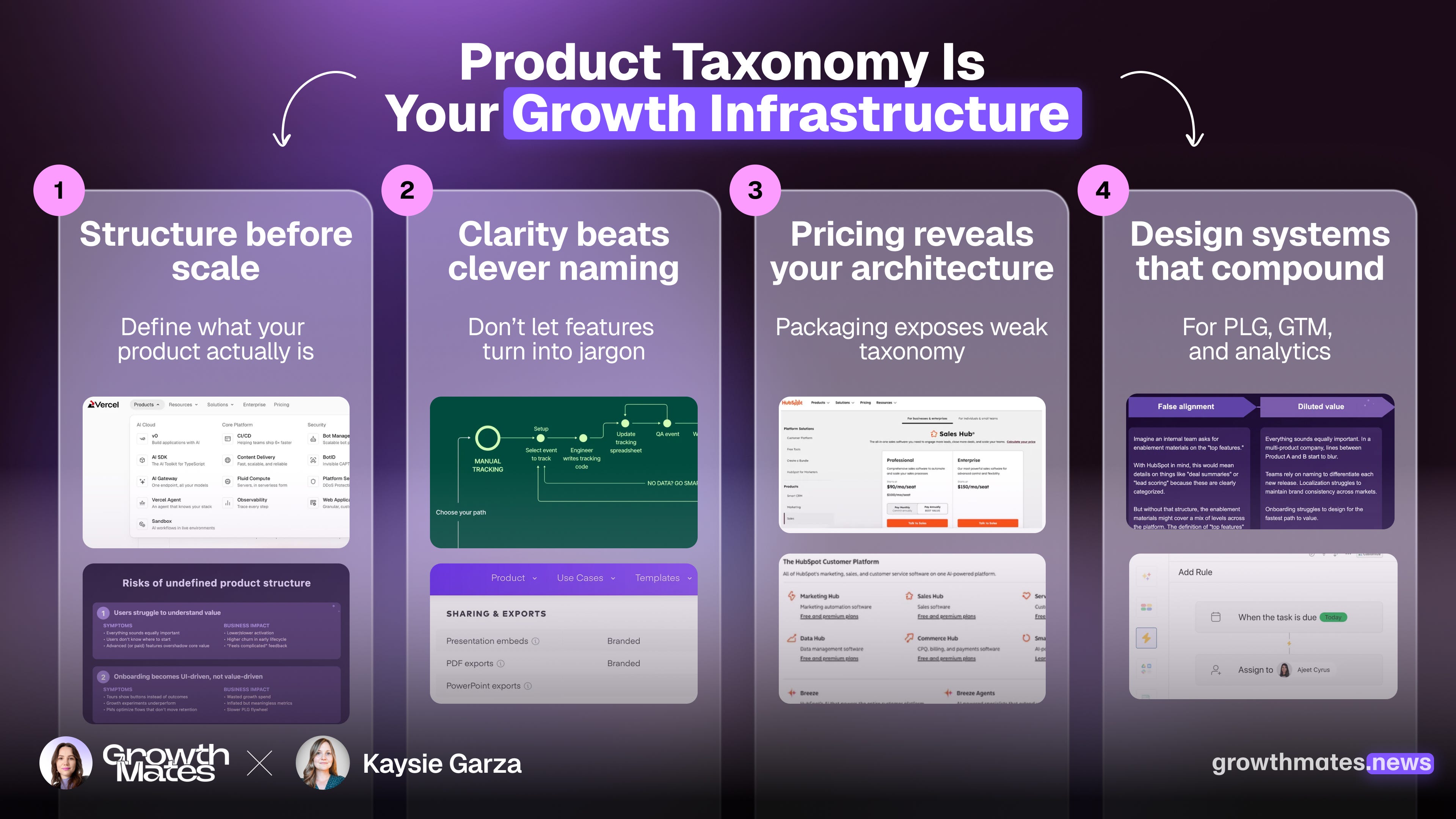
Introducing Kaysie Garza

Kaysie combines a decade of tech experience with a background in Linguistics to shape digital experiences and design things that make sense. After finding her place in Product at InVision, she went on to consult for ambitious agencies and high-growth companies. In 2021, she established the content design discipline at Hotjar, then integrated it into a larger analytics company after an acquisition. Today, you’ll find her leading and designing at Contentsquare.
So how does taxonomy trickle into product strategy and its success? It happens through layers. As Jesse James Garrett explains through his framework on the 5 planes of user experience, the structure comes before the surface. In other words, the taxonomy comes before any name.
Today, we’ll cover a handful of information design topics:
Why deliberate product structure is critical for growth
What to keep in mind as a PLG company getting off the ground
How to set up a structure that scales
Examples of what “good” looks like
In Jesse’s model, the upper planes are where all the product-led growth magic we know about happens — the viral loops, the activation experiments, the onboarding content strategies.
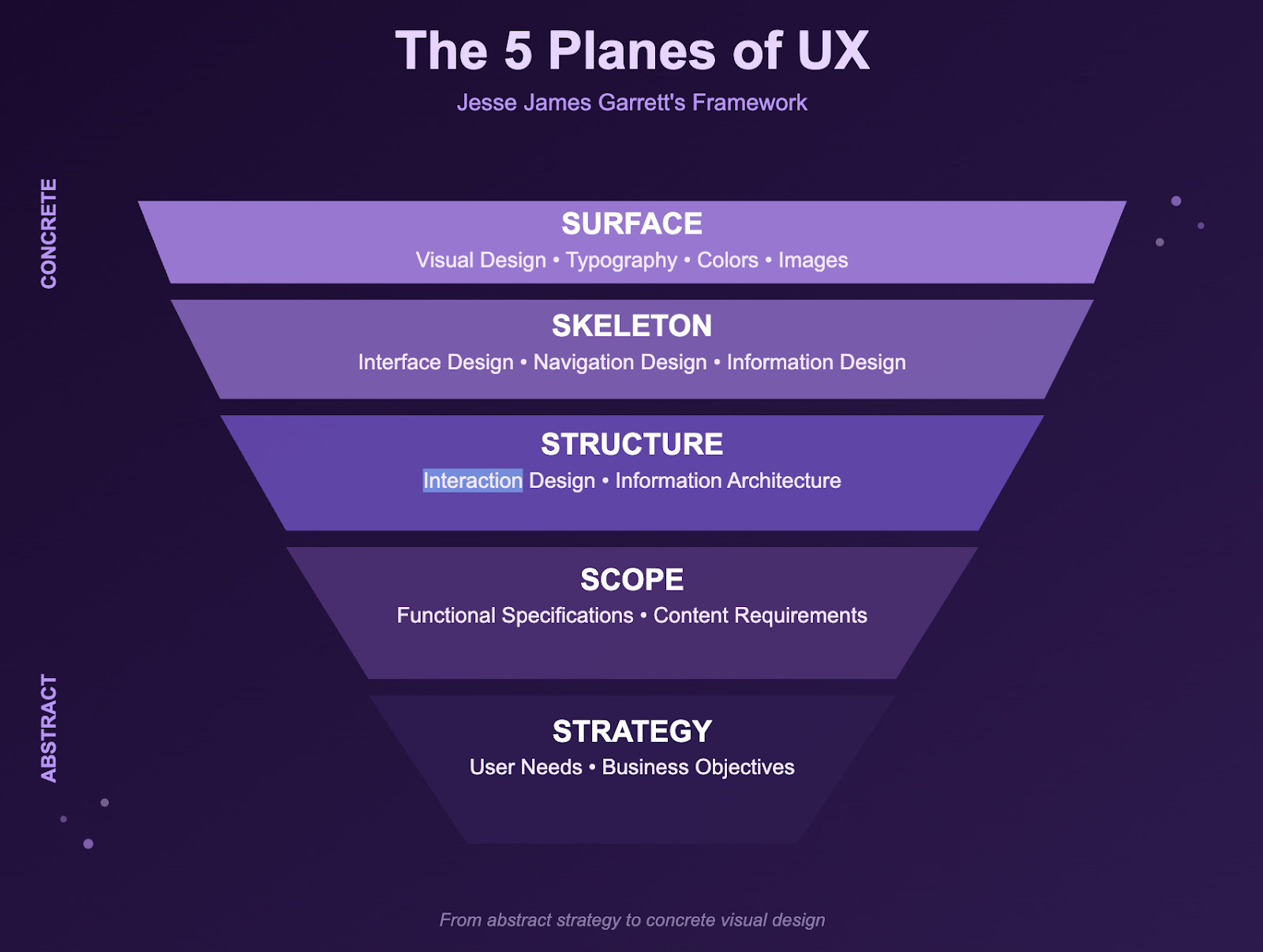
But when new or growing companies jump right into optimizing and flywheeling without clearly defining what their thing is or how it’s structured, growth potential gets limited and clarity debt builds. Positioning isn’t as clear, packaging might not click, and naming could spiral out of control with every new release.
Taxonomy is a system. It’s how you organize, categorize, and label information in a common space (in your case, a product). In a PLG context, your taxonomy must work simultaneously for:
Users (to help with learning and adopting)
Product teams (when building and shipping)
Growth teams (during onboarding and activation)
Sales and marketing (for positioning and pricing)
Analytics (in measuring usage and value)
Here’s a breakdown of how to apply information design principles for a stronger offering, and how to use that structure to define naming conventions that make sense (and make cents).
Shape your structure with the Principle of Least Effort in mind
Brains get tired. We all want to conserve mental energy, even if you don’t consciously decide to. This is why I recommend aiming for a maximum of about 3 “levels” within a product’s hierarchy. For example, you might classify all your functionality into categories like Product > Tool > Feature, or even just Product > Feature.
✅ Who does it well: Vercel
Simple structures cater to people taking the easiest path to understanding. Imagine this play out on site navigation: a Product dropdown opens to a few tools, and those each open to detailed feature descriptions.
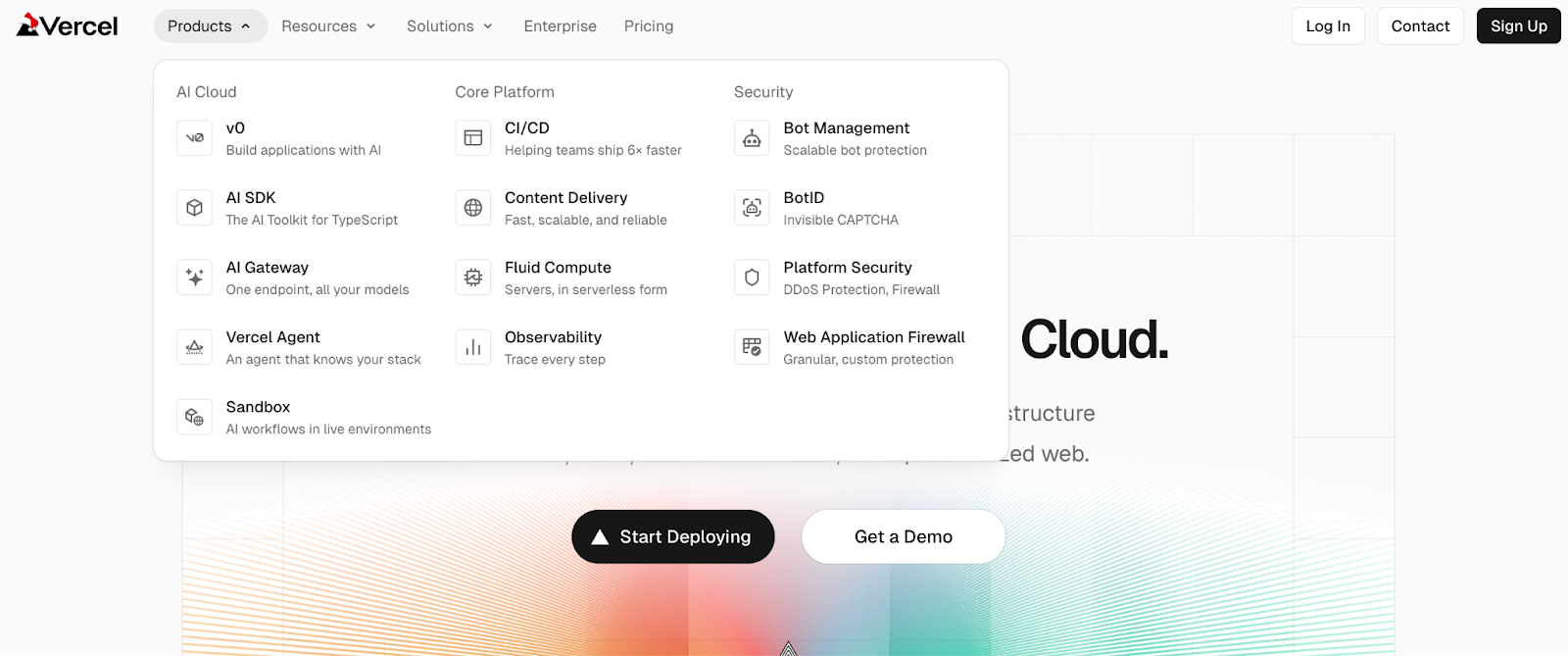
Having just two or three levels is also pretty common across SaaS, and that’s a good thing. Prior knowledge plays a big part in comprehension, so even a new company without the recognition of PLG giants can take advantage of this structural norm.
💥 Why this matters for PLG
Schema Theory focuses on the idea that learners who relate new info to existing mental models are more likely to understand and remember the info. An example of a complicated structure might be a Suite, made of Products, that each contain Tools, that each have multiple Features. This gives your users 4 levels to learn, especially if that isn’t common in your space.
If you’re building a PLG motion or trying to compete with someone more established, don’t reinvent the wheel. Keep your structure simple.
Connect the dots from experience to packaging
This is where I’ve seen the biggest gap between Product and Marketing emerge. Ideally, your classification of functionality aligns with how packages get put together. The most obvious handshake between these happens on your pricing page.
✅ Who does it well: HubSpot
I’ve been working on this topic for years, and I still haven’t seen it done better than HubSpot. When you look across touchpoints, there’s a consistent taxonomy: Platform > Product > Features, and it’s easy to see how they slot actual functionality into each category.

This isn’t just clear and consistent, it’s smart. According to Dual Coding Theory, people remember and learn better when information is given with a mix of text and visuals, like in site menus or navigation. One reinforces the other, and when you’re launching software, learnability is crucial for that growth momentum.
💥 Why this matters for PLG
Your taxonomy will never be fully user facing, but there are hints about whether or not it exists. Usually, that glimpse into your structure happens on pricing pages, navigation menus, help docs, and upsell or cross-sell moments.
These are the places where you have the opportunity to reinforce clarity with dual coding. When you do, there’s a big upside:
You improve comprehension and recall → good for adoption and engagement
You reduce cognitive load → good for expansion
You match language with interface meaning → good for usability and building trust
Treat clarity as infrastructure
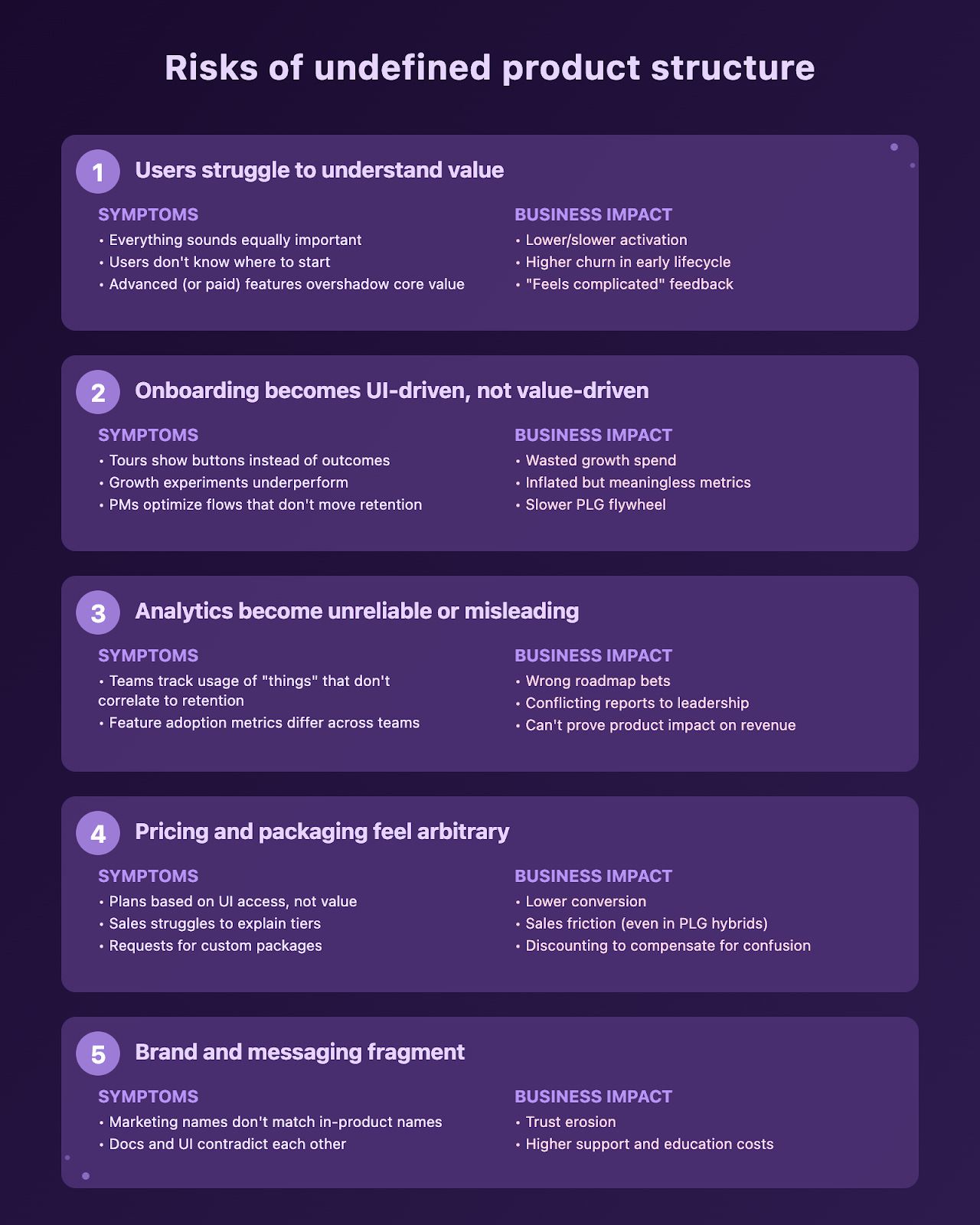
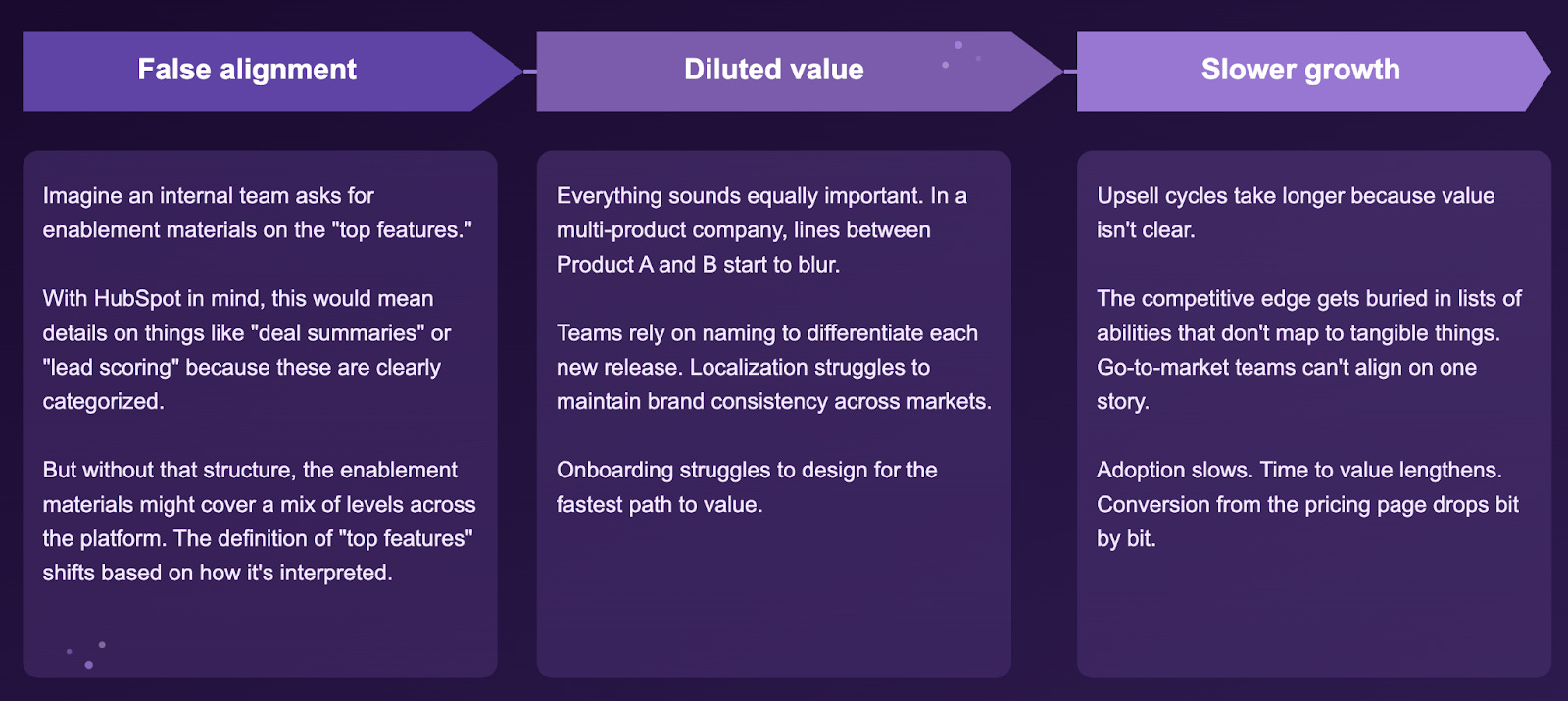
Confusion costs money. Without a shared way to classify what you build, more than just user understanding breaks down. It trickles into your operations, knowledge management, research studies, GTM release tiers, localization strategy, and more. When this kind of deliberate structure isn’t adopted and democratized, a lot can go wrong.
In a previous company, I saw pricing page conversions drop 20% after restructuring one product into two. This wasn’t only because of the packaging change. It disrupted the product taxonomy and confused customers about how different features were grouped and related to one another.
In my experience, the issues also tend to compound.
💥 Why this matters for PLG
Easy to start, easy to learn, easy to grow over time. That’s the heart of product-led growth. When users are blocked or stalled from one of those, all three suffer.
If you’re seeing low conversion rates from the pricing page, longer times to value, or limited self-serve upsells from new users, add taxonomy to your list of things to check on.
How to set up (or audit) a foundation to scale
Step 1. Start with an inventory.
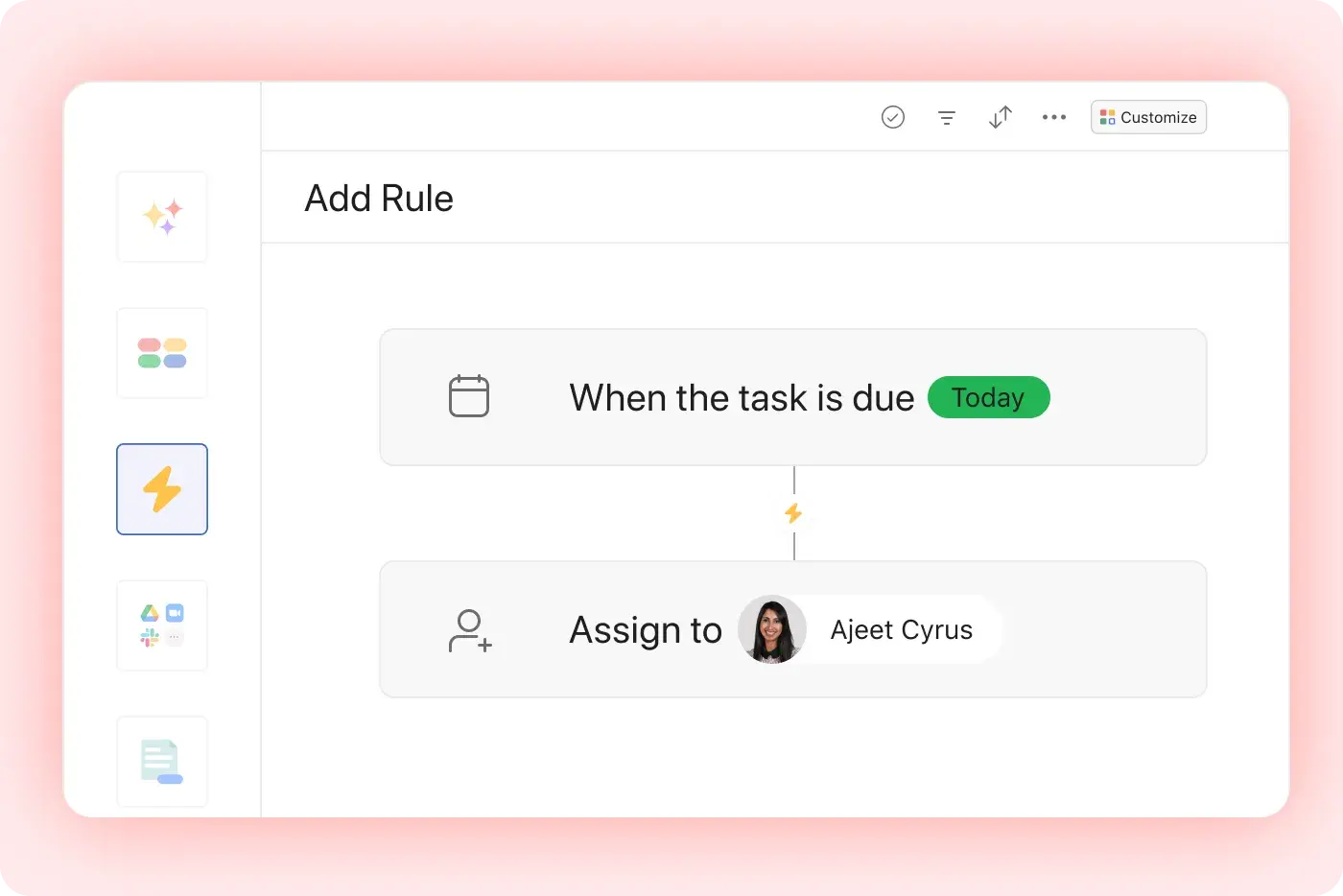
List out every single thing you’ve built or plan to build in the next few quarters. Focus on the smallest units of functionality. For this exercise, “workflows and automations” in Asana should break down to workflow builder, task dependencies, rules, custom templates, and so on.
If you’re new or just launched, do this now. The longer you wait to have a clear view of what makes up your product, the harder it is to regain later.
A few other pointers:
Start in a spreadsheet, then move to a visual that shows hierarchy later
Add a column for “alternate terms” to capture any internal variations of the same thing
Use “notes” or another column to loosely track what’s getting measured and how those events are named
Step 2. Define the levels of your architecture.
This takes a few iterations. Try to articulate what makes something like HubSpot’s Sales Hub different from just “lead scoring.” Consider things like how you sell, what users actually interact with, how functionality works together, and the market space your tech fills.
When I did this exercise at Hotjar, the top level of our architecture was defined by this criteria:
Provides the user with a distinct or new kind of insight
Creates a specific revenue stream based on a unique value metric
Introduces Hotjar to a new market space
A complete, standalone offering
Contrast that with the lowest level:
Functions as a part of a larger whole
A building block that adds concrete value
Individual elements that users interact with to accomplish specific tasks
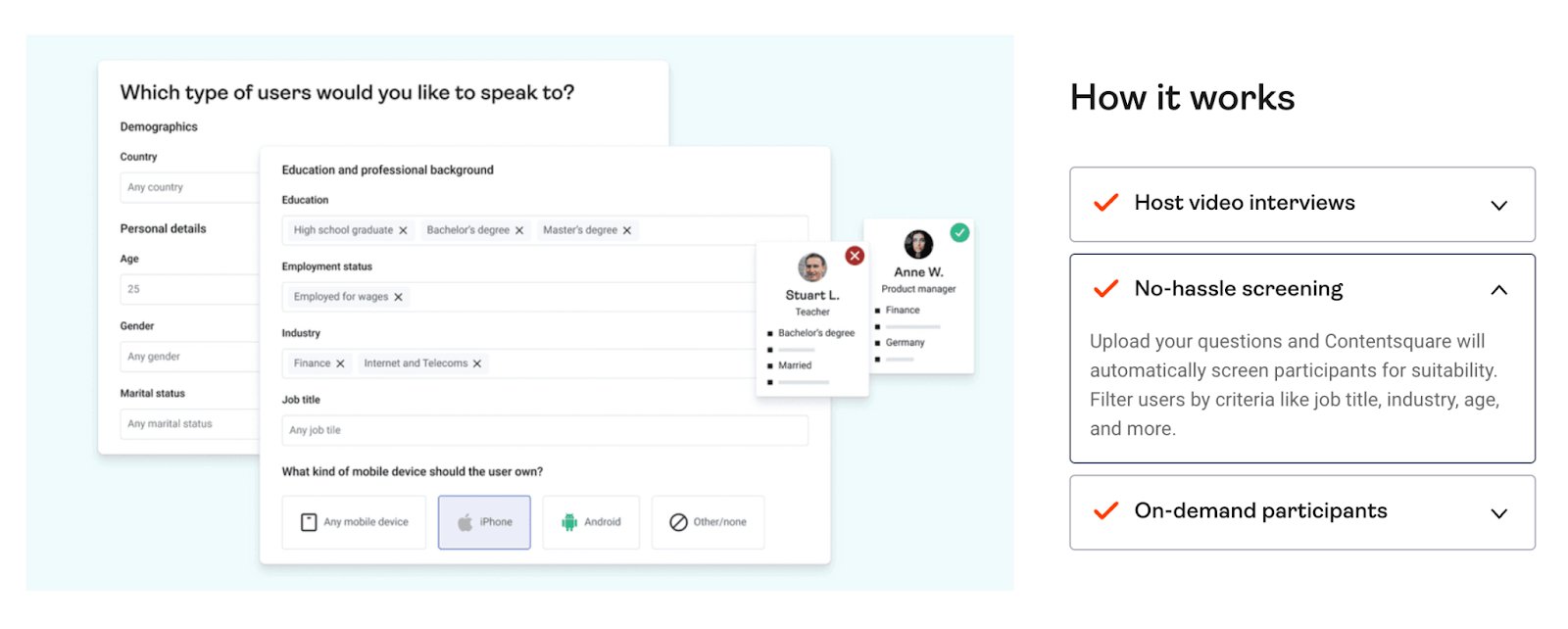
With that framework applied, screening, video interviews, and the participant pool were parts of a whole. Together, those features created a moderated research product that introduced Hotjar to a different market category and added a distinct value metric (interviews/month).
By documenting this rationale, you can apply it to every new launch. Use it like a decision-making framework to understand when something warrants a bigger marketing splash or could change how you onboard new users.
And for the sake of clarity, use it to create systematic naming.
Step 3. Draft naming conventions.
Don’t worry, they can be simple. These are the rules you’ll apply within your product’s architecture to name new things. Remember, some things don’t need a name at all.
How can you tell what does? Look back at that architecture and the rationale that defines each level. Your lowest level is likely generic functionality, the stuff that makes your product or tool work. This is a great place to keep terminology simple and descriptive.
For example, Pitch is a single product (level 1) made up of many features (level 2). Pitch’s naming conventions at this level might be:
Use short descriptive terms, in sentence casing
Phrase as 2–3 word nouns
Match industry norms
Add the company name to clarify unique concepts
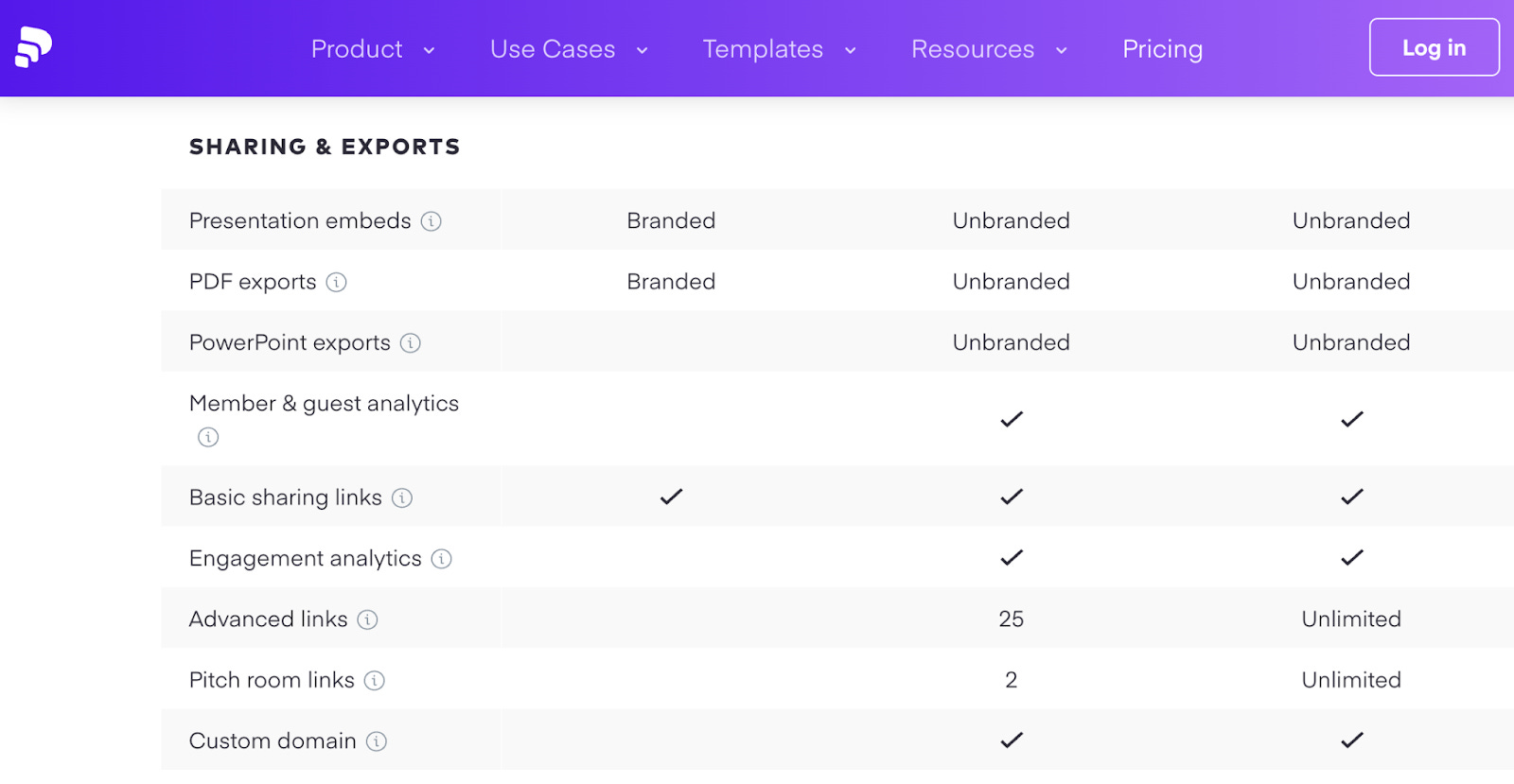
Clarity at this level, where you have the most “stuff,” supports trying or buying decisions and makes first-time UX easier to absorb.
There are a few cases where it does make sense to give unique names to core functionality. If it’s proprietary, first to market, or technologically more advanced or differentiated, it’s okay to explore branded names.
There’s a theory for this too: the Isolation Effect. It shows that when something stands out, it’s more likely to be remembered. If everything else in your lowest layer has a simple name, a single distinctive name will create a mental anchor to help users understand and remember it better.
✅ Example: Contentsquare’s Smart Capture
You’re likely familiar with “autocapture,” the functionality that means data teams don’t have to set up manual tagging ahead of time to track events.
For Contentsquare, autocapture works a bit differently. So it was a strategic choice to move away from industry language and elevate this with a branded name: Smart Capture. It opens the conversation for Contentsquare to elaborate on a memorable differentiator.
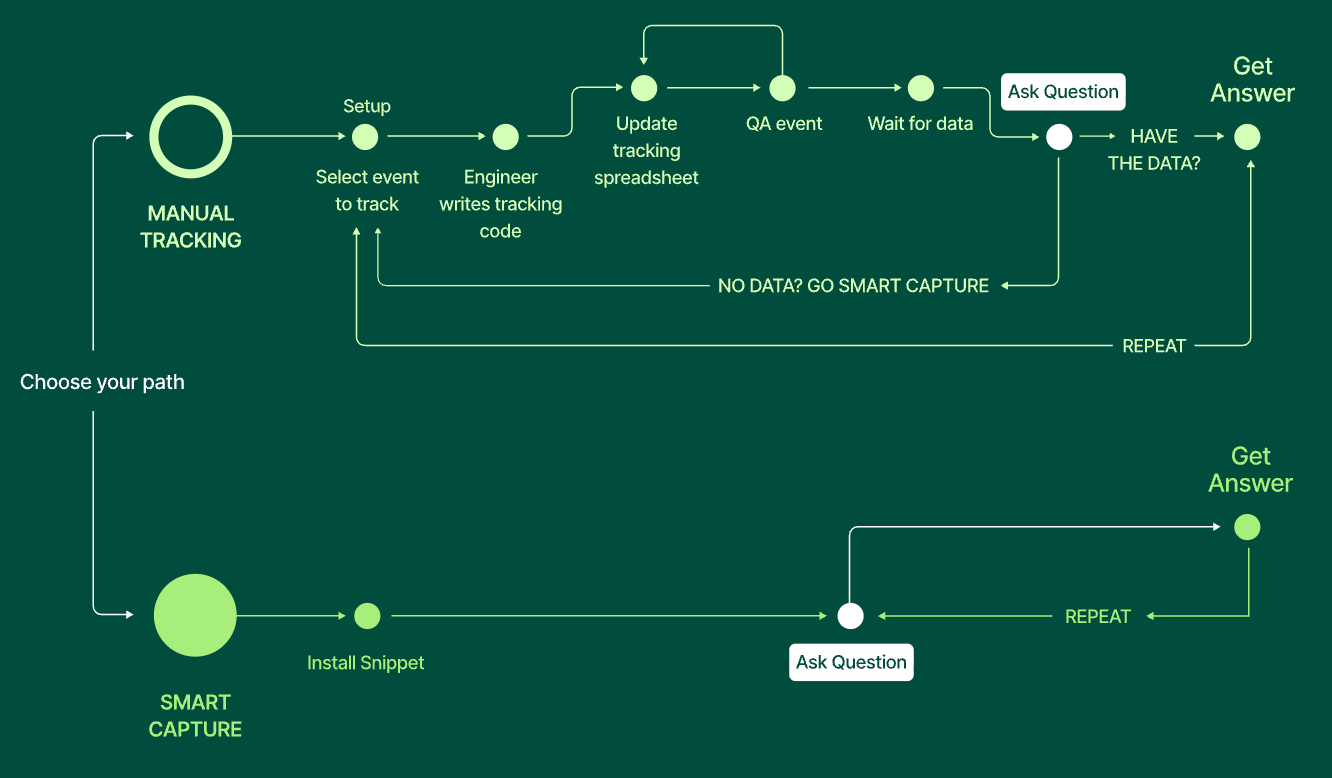
This is just one example of where you might break from a level’s naming conventions. Moderation is key. If you overdo it, your naming might sabotage the levels you set up.
To me, a “bad name” is usually a name that doesn’t need to exist. There are a handful of things that can go wrong in naming — like confusing users or choosing something that doesn’t translate well — but I believe structural disruption is one of the biggest risks.
Here’s a made-up example to contrast Calendly’s personalization features with overly named equivalents.

These names could influence how users see Calendly. Maybe “Brand Center” is actually a product rather than a single personalization feature? In a long list, like a pricing page or pitch deck, it might not even be clear that these 3 features even fit in the same category.
And if every other feature looks like these, the unique names start to look like a list of jargon. The Product > Feature levels break down because naming conventions undermine the whole system.
A few naming pointers:
Reserve proprietary names for things that are genuinely differentiated from competitors.
Develop different naming conventions for each level, watch out for too much overlap.
Use taxonomy to position these named features within your hierarchy.
Never use branded names as a substitute for poor architecture.
Taxonomy is your growth infrastructure
As I mentioned, I’ve seen issues compound — but the benefits of doing things well compound too. When this foundation is put in place for emerging PLG companies, the list of improvements touches every corner of the business.
GTM strategy works
Each layer gets the right emphasis
Core value is clearly distinguished from supporting features
True products lead with brand and enable sales
Competitive positioning sharpens
Analytics and decision-making get more precise
Feature use and core adoption map to consistent, tangible things
PMs get better signals about what to invest in
Stakeholder dashboards reflect insights at the right “level”
Cross-functional alignment improves
Teams or departments speak a shared language
The company has a shared mental model of what it builds and sells
Customer education scales alongside product evolution
Less rework in docs, courses, and enablement material
Self-serve use feels effortless
Users skip the “what do I need/what is all of this” conversation
Time to value speeds up
Onboarding shifts to teaching value instead of UI
If you’re not sure where to start or what to optimize first, create that inventory. This exercise alone can reveal where you might have hidden cracks, or where you should course correct to prevent clarity debt later.
🤝 Would you like to work with Growthmates in 2026?
Over the last few years, Growthmates has intentionally moved toward deeper, more focused collaborations — the kind where there’s time to think, challenge assumptions, and build something meaningful with a team, not just for them.
That’s the energy I’m taking into 2026. Because of this, I’m keeping my client work deliberately small and focused. Q1 will be the only window for 1:1 work for a while.
If you’ve been thinking about strengthening your onboarding, activation, or PLG foundation — this is likely the right moment. Here’s what I’m opening up for Q1:
Onboarding Design Sprint 🏃♀️
I will work closely with your team to help you fix your product growth challenges and improve the first user experience that can drive x2 uplift on your Activation.
👉 Work with me → (only 1 slot till April 🔥)
PLG Advising for your company 🧠
Hands-on, in-depth advising across product, UX, and growth to build a scalable, sustainable PLG system that will last for years.
👉 Work with me → (only 1 slot till April🔥)
PLG Training for your team 🎓
A structured PLG training using the same frameworks I’ve taught teams at Grammarly, Autodesk, Monday.com, Intercom, Atlassian, and more.
👉 Work with me → (2 slots till April 🔥)
Brand Partnerships 📩
Let’s tell your product story to a trusted audience of 30,000+ product, design, and growth leaders — and co-create meaningful content that inspires the wider product and design community.
👉 Send an inquiry to hello@growthmates.club (2 slots till May 🔥)
Premium Edition 💎
If you’re getting value from this newsletter, get access to full archive with more frameworks, teardowns, and exclusive content on PLG, Activation, AI, and how to build meaningful products that delight users.
👉 Upgrade to Premium and get full access.
This is all for today, dear readers. If you found this helpful — please share your reaction and leave some comments 💜 It would give a huge support for me to continue creating this!
If you find this newsletter valuable, share it with a friend, and consider subscribing if you haven’t already. There are some discounts available, and maybe you can expense this :)
Connect with me on LinkedIn and learn more about my work on Growthmates.club.
With best regards,
Kate Syuma